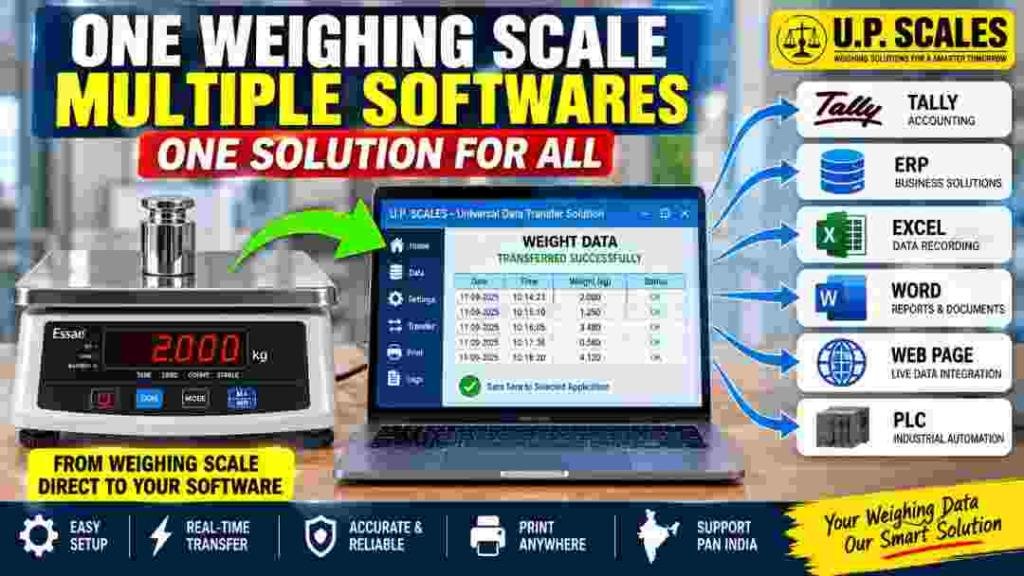
Transfer weighing scale data directly to Tally, ERP, Excel, Word, web applications and PLC systems with a customized solution from U.P. Scales.
A weighing machine normally has one simple job: place the material on the platform, wait for the weight to become stable, and record the result.
But in many businesses, recording the weight is only the beginning.
Once the weight is displayed, someone may have to enter it into Excel, update an ERP system, prepare a document in Word, enter the information into accounting software, send it to a web application, or pass the value to a PLC-based automation system.
That additional step can become a daily routine, especially when a business handles hundreds or thousands of weighing transactions.
This is where weighing scale data transfer software can make the weighing process much more connected.
U.P. Scales has developed a customized weighing data-transfer solution that can be configured to take weight information from a compatible weighing machine and transfer it to different software and systems, including Tally, ERP, Excel, Word, web applications and PLC-based systems.
From Weighing Machine to Your Existing Software
Businesses generally do not want to replace their complete software system just because they have installed a new weighing machine.
A factory may already be using an ERP system. An accounts department may work with Tally. A warehouse may maintain records in Excel. Another company may have its own web-based application.
The weighing system therefore needs to fit into the existing workflow.
The idea behind the U.P. Scales solution is straightforward:
Weigh the material → capture the weight → transfer the data → use it in the required application.
Instead of treating the weighing machine and computer software as two separate systems, the weighing process can become part of the company's digital workflow.
Weighing Scale to Excel
Excel is still widely used for weighing records, production records, dispatch information and inventory-related work.
With a suitable data-transfer setup, weight information can be transferred directly from the weighing scale into an Excel-based workflow.
This can be useful when the operator needs to maintain a running record of:
Date and time
Weight
Vehicle or material information
Product details
Customer information
Batch information
Quantity
Other business-specific fields
The exact Excel format can be designed according to the customer's requirement.
For businesses already comfortable with Excel, this can be a practical way of reducing repeated manual weight entry.
Weighing Scale to Tally
Accounting and billing processes often require the weight of material to be available at the right stage of a transaction.
A weighing-scale integration can be developed to transfer relevant weight information into a Tally-based workflow, depending on the customer's Tally setup and integration requirements.
This can be particularly useful where weight is part of:
Material billing
Purchase records
Sales transactions
Dispatch documentation
Inventory processes
Weighment-based transactions
Rather than typing the displayed weight manually every time, the weighing information can become part of the digital transaction process.
Weighing Scale to ERP Software
Large businesses often have their own ERP systems controlling purchasing, production, inventory, dispatch and sales.
In such environments, the weighing machine can also become a source of operational data.
The U.P. Scales software can be customized around the customer's workflow so that weighing information can be transferred to the required ERP application.
The actual integration depends on the ERP platform, available interfaces and the customer's technical requirements.
This is important because ERP integration is not a one-size-fits-all job. Different companies use different ERP systems and different data fields.
The software therefore needs to be configured around the actual application rather than assuming every ERP system works in the same way.
Weighing Scale Data to a Web Application
Many businesses today use browser-based applications instead of traditional desktop software.
In such cases, the requirement may be to send the weight from the weighing machine into a webpage or web-based application.
For example, an operator could have a web application open at the weighing station and use the captured weight as part of the transaction.
This approach can be useful for companies that already have a centralized web-based system for managing their operations.
Weighing Scale and PLC Integration
Weighing machines are also used in automated industrial environments where a PLC controls part of the production or material-handling process.
In these applications, the weight is not necessarily required only for displaying or recording information. It can also become an input for an automated process.
A suitable interface and communication method can be used to transfer weighing information into a PLC-based system, subject to the equipment and automation architecture.
This opens possibilities for applications involving:
Automatic filling
Batching
Material handling
Process control
Production automation
Industrial weighing systems
The exact PLC integration needs to be designed according to the PLC, weighing indicator and communication requirements.
What About Microsoft Word?
There are also applications where the requirement is not a database or ERP transaction but a document.
For example, a company may need weighing information to appear in a predefined Word document, report, challan or other formatted document.
A customized solution can be developed so that the captured weight is placed into the required document structure.
This can be useful when the final output needs to be printed or shared as a formal document.
Print Weighing Data From the Required Application
One of the useful aspects of a software-based weighing workflow is that the weighing information does not necessarily have to remain on the weighing indicator.
Once the data reaches the connected application, the application can be used to generate or print the required information, depending on how the solution has been configured.
This means the same weighing data can become part of a:
Report → Invoice → Challan → ERP transaction → Excel record → Web transaction → Printed document
The exact output depends on the customer's process.
Why Automate Weighing Data Entry?
Manual data entry seems simple when there are only a few transactions.
The situation changes when the weighing station handles dozens, hundreds or thousands of transactions.
A typical manual process may look like this:
Weigh material
↓
Read display
↓
Write down weight
↓
Open software
↓
Type weight
↓
Save transaction
↓
Prepare document
Every additional step takes time.
It can also create opportunities for typing mistakes.
With suitable integration, the process can be shortened:
Weigh material
↓
Weight captured
↓
Data transferred
↓
Transaction / record / document generated
The objective is not simply to make the weighing machine “smart.” The objective is to make the complete weighing workflow more efficient.
One Solution for Multiple Applications
This is the main concept behind the U.P. Scales software.
A business may need:
Weighing Scale → Excel
Another may require:
Weighing Scale → Tally
Another:
Weighing Scale → ERP
Another:
Weighing Scale → PLC
And another may require:
Weighing Scale → Web Application
The software can be developed and configured around the actual requirement.
That makes it particularly useful for businesses that have a specific workflow rather than a standard off-the-shelf requirement.
Where Can This Solution Be Used?
Weighing-scale data integration can be considered for many applications, including:
Manufacturing
Capture production-related weight information directly into the digital workflow.
Warehouses
Record incoming and outgoing material weights while maintaining electronic records.
Dispatch Departments
Use weighing information as part of dispatch documentation and transaction processing.
Logistics
Connect weighment information with software used for operational records.
Production Automation
Send weight information into automated systems where compatible interfaces are available.
Inventory Management
Use weight information as part of stock and material records.
Commercial Weighing
Transfer weighing results into billing, accounting or documentation workflows.
Designed Around Your Requirement
One of the important points about weighing-scale software integration is that the customer's existing workflow matters.
There is no single Excel format, ERP system, Tally setup or PLC architecture that works for every company.
Before developing an integration, requirements such as the following may need to be considered:
Weighing machine model
Weighing indicator
Communication interface
RS-232 / USB / other available interface
Computer or network environment
Target software
Required data fields
Data format
Printing requirement
Database requirement
Automation requirement
After understanding these requirements, the integration can be designed around the actual application.
U.P. Scales – Weighing Data Integration
U.P. Scales provides weighing machines as well as customized weighing solutions for businesses that need to connect their weighing process with their existing digital systems.
The Weighing Scale Data Transfer Software demonstrated in our video is designed around the idea of connecting the weighing machine with multiple types of applications.
Whether your requirement involves Excel, Tally, ERP, Word, a web application, PLC or another compatible software system, the requirement can be discussed with our technical team.
The objective is simple:
One Weighing Scale. Multiple Applications. One Connected Solution.
If your business currently depends on manually entering weight data, talk to U.P. Scales about your requirement and find out whether your existing weighing machine and software can be integrated.
U.P. Scales – We Weigh India.
Watch the Weighing Scale Data Transfer Demonstration
In this video, we demonstrate how weighing data can be transferred from a weighing machine into different software and systems, including Tally, ERP, Excel, Word, web applications and PLC-based systems.
The demonstration shows the concept of using one weighing-data solution across different business workflows.
Need reliable general-purpose laboratory balances? U.P. SCALES, authorized dealer of Aczet, offers CG-L precision balances, CG-N counting scales, CG-S stainless steel scales, and CG Series table top balances. Pan India delivery & installation.
In today's dynamic industrial landscape, weighing operations are no longer confined to fixed locations. Field service teams, mobile inspection units, logistics fleets, and temporary production sites all require weighing systems that can travel with them.
Tower lamps, also known as stack lights or signal towers, provide exactly that. These rugged, highly visible LED light stacks mount directly onto or near the weighing console and illuminate in different colours to indicate specific conditions.